> For the complete documentation index, see [llms.txt](https://horus-make-sense.gitbook.io/documentation/llms.txt). Markdown versions of documentation pages are available by appending `.md` to page URLs; this page is available as [Markdown](https://horus-make-sense.gitbook.io/documentation/tutorials/working-with-horus-recordings/quality-checks/recording-checks.md).
# Recording checks
This chapter is part of the Citymapper workflow.
Please follow the steps below to verify that the the images and positions have correctly been recorded.\
These steps should preferably be done right after recording the data.\
If a fault is found, discern the cause and if possible retake the recording.
## Checklist - Recordings
### Trigger Check
#### Position Fixer Check
1. Select the recording directory and select the ‘Generate Frames’ Algorithm.
2. Go to ‘reports -> Frames’ and check the recordings from there.
\
If there are red crosses then there is definitely something wrong, open that recording to verify which camera has an issue.
\
Even if there are only green check marks, that does not necessarily mean that everything is correct. Sample a few recordings and look for anything that might be amiss.
{% tabs %}
{% tab title="Cross Correlation" %}
Graph should show a symmetric **V** that intersects at the bottom.\
It is fine for it to not intersect at 0.
{% endtab %}
{% tab title="Relative Time Series" %}
De two lines should overlap.\
If the lines are running parallel or are divergent, then this recording runs the risk of not being able to be muxed.
{% endtab %}
{% tab title="Frequency" %}
This graph shows the of triggers per seconds over the entire recording\
The two lines should overlap. If the camera line drops below the other then this would signify lost images for that frame.
{% endtab %}
{% endtabs %}
With this check you should cover the majority of the triggering issues, but if you wish to thoroughly check, then follow the next 2 steps below.
#### Check Recording Directory
* Go to the Recording Directory and verify that the recordings contain data from each device; verify that data was written for the MNEA, and each camera (+ trigger).
#### Signals.csv Check
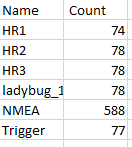
* Open the signals.csv file to verify the amount of triggers that each device received.\
\
Each camera should have the same or similar (±5 frames) amount of frames as the Trigger. If there is a major difference between one or more of the cameras then something is likely amiss.\
### Visual Check
* Open a recording in the Horus Movie Player.
* Visually check the data for the following:
* image quality; blurriness, focus, lighting, etc
* synchronization of the images
* Missing images
* stitch (applicable with HR cameras).
If something did go wrong, find the cause, resolve it, and then re-record the data.


 ### Visual Check
* Open a recording in the Horus Movie Player.
* Visually check the data for the following:
* image quality; blurriness, focus, lighting, etc
* synchronization of the images
* Missing images
* stitch (applicable with HR cameras).
If something did go wrong, find the cause, resolve it, and then re-record the data.
### Visual Check
* Open a recording in the Horus Movie Player.
* Visually check the data for the following:
* image quality; blurriness, focus, lighting, etc
* synchronization of the images
* Missing images
* stitch (applicable with HR cameras).
If something did go wrong, find the cause, resolve it, and then re-record the data.